Tuesday, March 26, 2019

More text control codes figured out!

After doing the Menu Help translation i noticed that there were a lot of unverified control codes that we didn't figured out yet.
So, after a little bit of tinkering the sweet lady decided to tell us all about her deep and dark secrets:


This should make editing a loooot easier (looking at you, "Menu help.FLK"!)


Monday, March 25, 2019

Slow and Steady

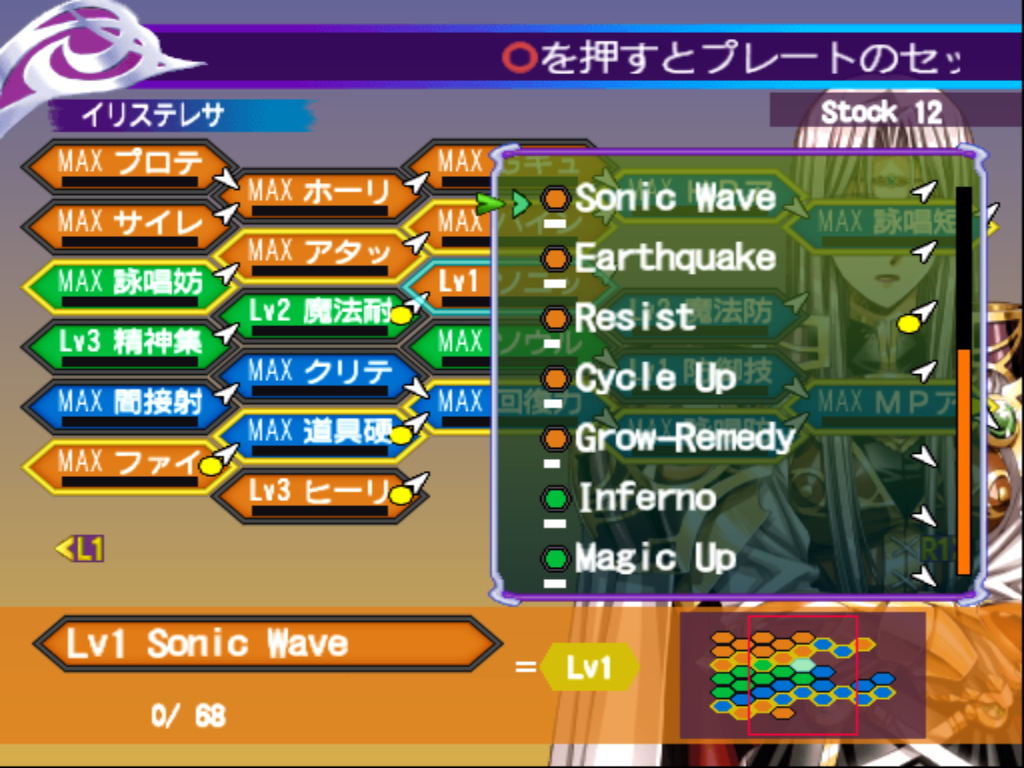
Hey everyone! It's mako again. No major updates for now, but some major stuff is on the way! Till then, enjoy this fully translated screenshot! 


You may have also noticed the Menu icons. Yes, we recolored them to match the game's aesthetic! There are also some icons that had to made from scratch, but I'll cover that in a more detailed future update. 

See y'all soon!

Friday, March 22, 2019

And we found all the missing system text lines

I was wondering, even thought we found all the "System" text files, why couldn't i find a file that actually containted the text  ひらがな and カタカナ, which for example is used in the charactername screen.
After some digging it turns out that all of that is stored inside the executable SLPM_667.16, a so called "ELF" file:


Here's the character creation, now translated to english:


But. the ELF file is not like the other GL6 script files.
Right now it's not possible to "dump" the script with the pointers.
And, what is even worse, we cannot go over the original length because of that.
I'm going to check out programs like "ps2dis" and "PCSX2dis" to see if i can somehow dump the executable file and reprogram it for the translation.

Sunday, March 17, 2019

We found the Menu pictures and imported them to GL6!

You read right! We found the menu pictures of GL5 and 6.
They are located in the folder

GL5_FILE.DAT / 000001e0.tm2
GL6_FILE.DAT / 0000025c.tm2

and have the file ending ".tm2".
To open those files you need to use the program called "Rainbow":

https://www.romhacking.net/utilities/1069/

A simple copy and pasting from GL5 to 6 works like a charm:


Sadly, the GL5 file is actually missing some entries, so we can't use all of it:


Fun fact:

It actually looks like that the western release was the reason we got "fancy" menues in GL6.
Here's how it looks like in the original GL5:


Saturday, March 16, 2019

Menu Translations

Hey y'all, mako here. I've been assisting Risae with this project. I'm no programmer so my role is pretty much limited to text insertion. This is what I've been up to for the past two days.

Consumables and Key Items have been fully translated!


Item descriptions will probably take much more time though. The original Growlanser Realm translation didn't include any of the key items and equipment, so they had to be translated manually. Since neither of us is fluent in Japanese, I used the official Growlanser Heritage of War script, Google translate, Bing translate (it's actually surprisingly good) and my own intuition to fully localize the equipment and key item names. Don't worry, I made sure none of the names sounded machine translated and I did my best not to stray too far from the original. The same process will have to be repeated for the item descriptions and I am NOT looking forward to it lol.


Accessories haven't been translated yet, as they seem to be hiding in another file. Hopefully they're identical to HoW so I won't have to use three different sources and my own head to translate them.

Skill Plates have been fully translated!


Translating these was MUCH easier than the items/equipment. All skill names are taken directly from Heritage of War for the sake of consistency (and because they're literally identical).


The Ability Tree is still pending, though that wont take long at all. The same method as the skill plates will be used here.


That's pretty much all I have to show for now. What I'm focusing on next is the Ability Tree and then the Spells/Knacks menus and accessories (I may or may not do the item descriptions next, we'll see lol). Then I'll be set for starting a full playthrough of the game with the game script to capture any and all Japanese text I can find, so that we can then move on to inserting the dialogue. This is important as the dialogue text generally isn't placed in order in the script files. This means we have no idea what the next line of text says. Therefore we need the text from the game, with the context intact, in order to search it in the file, and then replace it with the English text according to story progression. 

That wraps up my update for today. Hopefully my next update will include item descriptions (we'll see lol). See y'all soon!